
AI Software for Small Business: The Complete 2025 Guide to Building Smarter Systems

Updated: 4 hours ago
AI software is no longer just a futuristic idea; it’s now how small businesses scale faster, run leaner, and make smarter decisions every day. In 2025, AI isn’t about replacing people; it’s about multiplying what they can achieve. This guide breaks down the top tools, workflows, and agentic systems that can turn a small team (or even a solo founder) into a high-performing, automated operation.
Why Small Businesses Can’t Afford to Ignore AI in 2025
From Tools to Systems; The Shift That’s Defining 2025
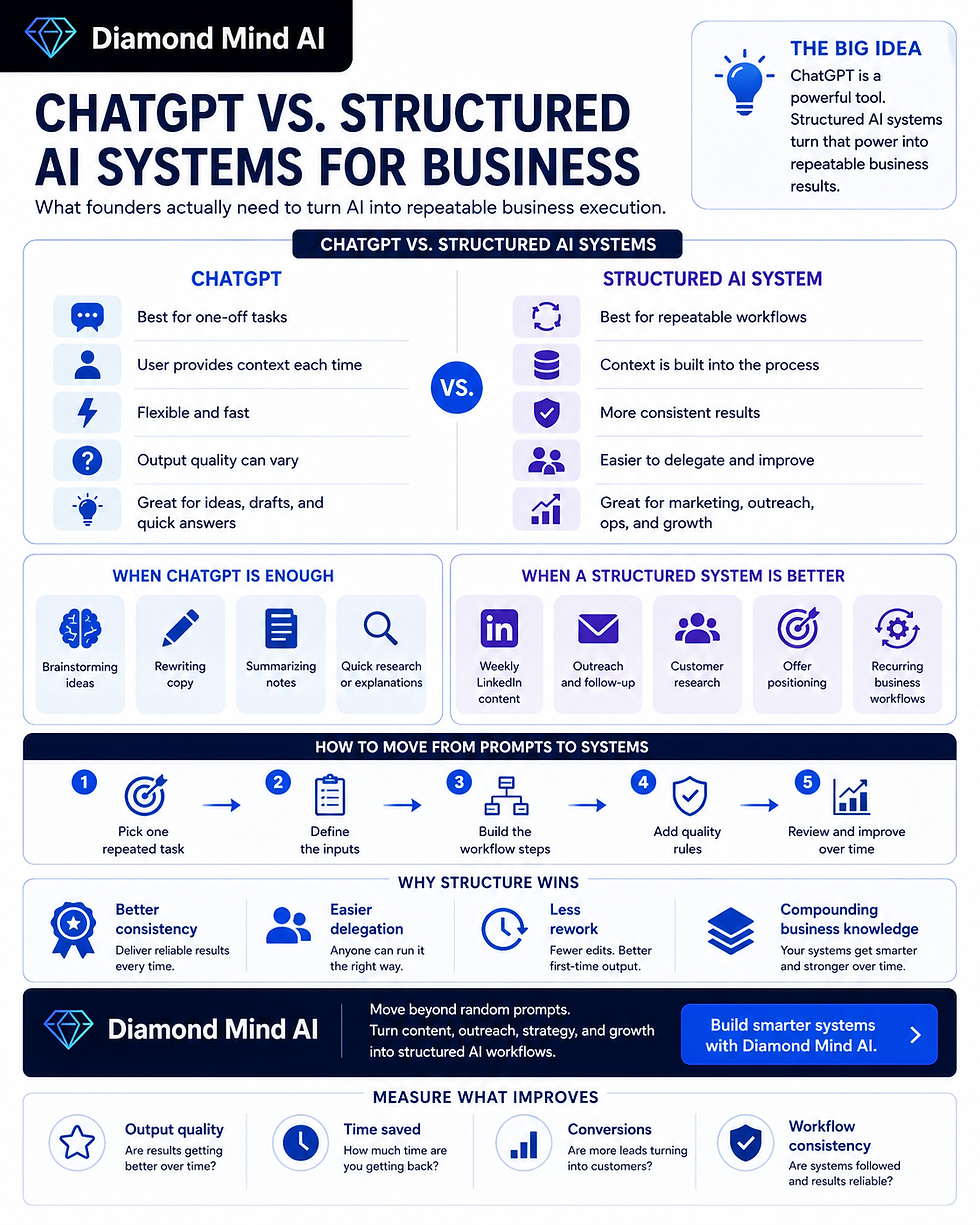
AI adoption has exploded, but most businesses still treat AI as a collection of disconnected tools. The winners in 2025 think differently; they build systems. A system connects multiple tools into repeatable workflows: research → decision → output → QA. That’s where the compounding effect happens.
The Competitive Edge for SMBs
When evaluating AI across operations, compare these measures with your existing process:
Content quality and delivery time, including editing.
Operating costs, including tools, setup, and review.
Customer response time and accuracy.
Common Myths (and What’s Actually True)
Myth 1: “AI is always too expensive.” Costs depend on the tools, usage, integration, and review effort. Compare the total cost with the task’s value.
Myth 2: “AI always requires a data team.” Some tools offer visual setup, while custom workflows can require technical support.
Myth 3: “AI automatically replaces people.” Decide which tasks are suitable for assistance and retain human responsibility for decisions and quality.
The 3-Layer AI Stack for Small Business Success

Building your AI foundation is easier when you think in three layers; Tools, Systems, and Agents.
Layer 1: Foundational Tools (Your Core Stack)
This is where most small businesses start. You’ll need a few essentials:
Creation tools (ChatGPT, Claude) for writing, brainstorming, summarizing.
Organization tools (Notion, ClickUp, or Asana) for process tracking.
Automation tools (n8n,Zapier, Make) for connecting workflows.
Data tools (Airtable, Sheets) for structured information.
Pro Tip: Choose flexible tools, not ones that lock you into a single vendor.
Layer 2: Business Systems (Your Repeatable Processes)
Once the tools are connected, build systems that align with how your business actually works:
Marketing System – Automate research, copywriting, and social posts.
Sales System – Use AI for lead scoring and personalized outreach.
Operations System – Track projects, automate reports, and assign next steps.
Read about AI Marketing Systems
Layer 3: Agents & Automation (Your Scalable Workforce)
Agentic workflows can connect planning and tool use across several steps. Define permissions and approval points, and use reviewed feedback to refine the process.
Read about Agentic AI in Business
Illustrative example: a marketing coordinator workflow could organize competitor research, draft posts, and summarize engagement. Measure the time and quality impact, including review and corrections; this is not a verified customer result.
The Top 5 AI Software Categories Every Small Business Needs
1. Marketing & Customer Acquisition
AI can assist with marketing drafts and research. Review its work before using it for:
Blog & social post generation
Audience research
Ad copy iteration. Read about AI Marketing Systems
2. Operations & Workflow Automation
Automation platforms can connect supported tools for recurring administrative tasks, subject to integration and permission limits. Test each step before using it in live operations.
3. Finance & Decision Support
AI-driven financial tools can predict cash flow, categorize expenses, and even detect anomalies, helping you stay proactive instead of reactive.
4. Sales & CRM Intelligence
AI can assist with organizing pipeline information and drafting follow-ups. Check the data and review outreach before sending it; staffing or growth benefits should not be assumed.
5. HR & Talent Efficiency
Use AI to streamline recruiting and training:
Generate job descriptions
Filter candidate resumes
Build onboarding documentation

How to Choose the Right AI Stack for Your Business
Identify Your Business Bottlenecks
Start where the pain is loudest; whether that’s content creation, lead follow-up, or reporting. Every system should remove one friction point.
Match Tools to Systems, Not the Other Way Around
Don’t chase shiny apps. Define your process first: What needs to happen, in what order, and who checks the work? Then, map the tools that best fit those needs.
Keep Cost and Integration in Mind:
Compare current tool pricing, usage limits, integration effort, and review costs before selecting a stack. There is no single budget that establishes a suitable setup for every business.
Implementation Blueprint; Deploying AI Systems That Actually Work
Step 1: Map Your Processes
List 3–5 recurring workflows (content creation, client onboarding, invoicing). These are prime for automation.
Step 2: Test with Low-Risk Tasks First
Start with internal processes (e.g., generating drafts, summarizing reports) before client-facing automations.
Step 3: Scale What Works
Once a workflow delivers consistent results, expand it. Example: if AI-generated blogs perform well, train it to produce outlines for newsletters and emails.
Step 4: Measure Costs and Benefits
Compare the value of measured time savings with the costs of tools, setup, maintenance, and human review.
Use your own baseline and observed results. A hypothetical calculation does not establish a financial return for your business.
Read about AI for Entrepreneurs
Illustrative Example: Organizing a Solo Consultant’s Work
Consider a hypothetical consultant managing proposals, research, and marketing. This is an illustrative scenario, not a verified account of a named person or a Diamond Mind AI customer result.
Prepare proposal drafts for review.
Summarize authorized research documents and verify the sources.
Plan social posts and approve them before scheduling.
Evaluate the workflow by measuring review time, accuracy, turnaround, and cost against the existing process. No workload reduction or faster turnaround is established by this example.
Common Mistakes When Adopting AI Software
Tool Hopping Without Strategy; Using ten disconnected apps creates chaos.
Ignoring Data Hygiene; AI depends on clean, structured inputs.
No Prompt or SOP Library; Documentation multiplies efficiency.
Expecting Instant Results; Systems improve iteratively.
Skipping QA; Always keep a human in the loop.
Read about Agentic AI in Business
Next Steps; Build Your AI System Today
Define a useful process before selecting tools, and test low-risk tasks with human review. Diamond Mind AI is in private testing, and public signup is closed. The workflows in this article are educational examples, not verified Diamond Mind AI capabilities or customer results.
Frequently Asked Questions
Q1: What is the best AI software for small businesses in 2025?It depends on your goals. For content: ChatGPT or Claude. For automation: Zapier. For analytics: ChatGPT Advanced Data or Airtable AI.
Q2: Can I build AI systems without coding? Some tools support visual workflows or templates. Custom integrations may still require technical skills and testing.
Q3: How do I measure ROI from AI? Track hours saved, cost reduction, or increased output vs your baseline month.
Q4: Is AI too expensive for startups? Evaluate current tool prices alongside setup, usage, and review costs. Start only where the expected benefit justifies the total cost.
Q5: What’s the difference between AI tools and AI systems? Tools help you complete a task. Systems connect tools to achieve outcomes; that’s where compounding efficiency happens.
About the Author
Written by Amir Razi, Head of Marketing & Business Development at Zero Impact Energy (ZIE) and Founder of Diamond Mind AI. Amir has led marketing and growth across clean energy, EV infrastructure, and AI-driven business systems, helping organizations scale smarter through strategy, automation, and intelligent design.


Comments